|
|
Please read on to learn more about how to best prepare your digital files when ordering 35mm slides.
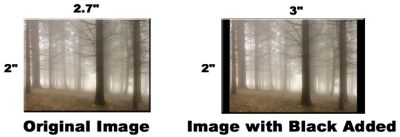
"Black" Added Automatically
The iPrintfromHome.com system is designed to automatically add "black" around your image if it is not proportional to the 2x3 aspect ratio of a 35mm slide.
If you want to do your own cropping, use a photo editing software program like Adobe Photoshop to crop your image using a 2x3 aspect ratio.
Image Rotation
The iPrintfromHome.com system will automatically rotate your image to maximize the image size within the slide frame. Accordingly, "vertical" images will be output as "vertical" slides.
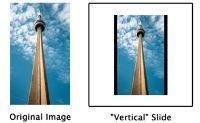
Image Cropping and Slide Mounts
We do not offer services to crop customer files at iPrintfromHome.com. We feel that cropping is a subjective decision and that you will ultimately get the best results if you crop your files personally. We recommend that you use a photo editing program like Photoshop to crop your digital files to your exact specifications.
Although each digital file is imaged "full frame" on slide film at a resolution of 2732x4096 pixels, a small portion of each image (approximately 3%) will be cropped by the slide mount. The amount of the image cropped by the mount is negligible and seems to only affect images that have critical information very close to the edge. Most of our customers submit their digital files "as is" and are very satisfied with the 35mm slides that they receive.
If you would like to receive 35mm slides that display the "full frame" of your digital files, we recommend that you place a small black border around your images to ensure that your slides will display your digital images with no cropping whatsoever.
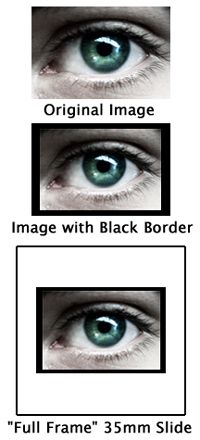
We use standard slide mounts at iPrintfromHome.com that measure 2x2 inches in size. The mounts are plain, white plastic mounts.
Click here to sign up and start using iPrintfromHome.com right now!
Questions? Comments?
Click here to read our FAQ.
Click here to contact us.
|




 Welcome to iPrintfromHome!